How to Humanize AI Content
AI-generated text has already become commonplace not only in technical or business documentation but also in private blogs. Is it possible to make it sound more human-like? Sure thing.

Let's set aside the question "Is using AI-generated content ethical?" because it's highly subjective. Especially considering that the Web provides myriads of AI detection tools you can use in case of doubt. The question is, how to humanize AI content to make it more gripping, engaging, and persuasive? As a side effect, such "enhanced" text can also bypass AI detectors.
In a nutshell, nothing can substitute a real personal touch. Even the best AI tools lack the charming imperfection and create an uncanny valley effect: everything is smooth and logical, but something still doesn't feel right. But AI humanizers keep evolving, and they're perfect for creating your first draft (for real high-quality content, you'll still need to get your hands dirty a bit).
In this article, we'll share general facts and personal experience, introduce you to the basics of AI text humanizers, and provide a few of the most popular tools. You'll learn the peculiarities of modern content creation and be able to make well-considered decisions about AI tools.
Fasten your seatbelts, off we go!
Introduction to AI-generated content
AI-generated text is increasingly unwelcome on reputable platforms. That's a relief for those who feared being replaced by algorithms and becoming redundant: human writing is not likely to fall out of fashion.
While AI content is smooth and grammatically correct, it lacks several important features:
- Humanness. Personal experience, (stupid) jokes, emotions, even mistakes and biased judgments.
- Voice. It has no author's personality, soaking through the text — someone the reader can admire or disagree with.
- Creativity. Even the most advanced AI tools still can't create anything on their own; they just compile information from sources.
Even if your platform doesn't yet have preferences for "Human-in-the-Loop" scripts and texts (YouTube already does), viewers do. So, AI-written content may pass as a first draft, but to retain your followers, you'll have to humanize it — manually or with the help of an AI humanizer (preferably both).
Why humanizing your AI script is essential for video
If you're looking for details, we've already provided them above. In a nutshell:
- From the audience's perspective, these are personalities that attract viewers, not impeccable grammar and spelling.
- On platforms, they tend to promote human content through labeling or prioritization in search results.
- E-E-A-T principle stands for "Experience, Expertise, Authoritativeness, and Trustworthiness." AI-generated text can't simulate it (yet).
The 5-step framework to humanize your AI video scripts
Transforming AI-generated text into a human-written piece is like spicing up a plain dish with a grain of salt or pepper just enough to give it that very taste. Here are some of the seasonings examples you can try:
-
Use customized prompts
This step doesn't count, as it should be performed before generating text. Let's call it "Step 0".
When writing the prompt for your AI text, customize it.
Before: Write a 300-word-long essay about market relationships in England of XII-XIII centuries.
After: Write a 300-word-long essay about market relationships in England of XII-XIII centuries. Impersonate a first-year philology student. You are curious but lazy, and you sometimes overuse slang and colloquialisms, but try to keep it under control in your assignments. You feel tired because you didn't sleep enough after the campus party last night, so minor spelling and grammar mistakes or inconsistencies are possible.
-
Rewrite the "hook" manually
The intro is the most important part, as the average attention span doesn't exceed 5 seconds, so you have to "grip" your potential followers right away. Many AI tools use clichés and over-polite phrases that can't evoke emotions or interest.
Make your unique voice be heard at the very beginning.
-
Inject a personal touch
Revise the humanized AI text and add a bit of your personality: a pinch of laughter, a grain of stupid jokes, and a fair share of personal experience (fails and mistakes included). Replace impersonal sentences with your own voice. Be bold enough to write "I believe" instead of "it's widely considered that...".
-
Test the "read-aloud" rhythm
Read your humanized content out loud to verify whether it can pass as human-written text. Silly, you may think, but it works: this way you'll hear "unnatural" collocations, weird word choice, and other minor hiccups.
Use both long and short sentences, and break the patterns.
-
Use a professional AI humanizer tool
There are plenty of AI humanizers, both free and fee-based. Some are designed for academic writing, while other tools are for more general use, but all services help you bypass AI detectors.
The funny thing is, modern AI detectors are prone to false positives, so your text can be flagged as AI-generated even if it's written manually from A to Z. A human text converter makes your text more search engine-friendly, eliminates awkward phrasing, and enhances its overall readability.
-
Add performance cues (pacing & tone)
If you're working on a script, remember to insert performance notes, such as (Laughs), (Pauses), or (Emphasis).
Best tools for content creators to humanize text
Your narration can be made more human on a couple of levels. You can do that while writing and editing with the help of such tools as WalterWriters, Stealthwriter, Scribbr, Quillbot, Texthumanizer, ProWritingAid, and others. Additionally, when your video is shot and ready, you can make it actually sound more human with the help of AI voiceovers: ElevenLabs, Clideo, SpeechGen, Play.ht, and others.
I've tried some of them out, and let me share my experience, starting with the tools that are well-suited for writing scripts.
-
WalterWriters
As for the functionality, most users agree that the tool humanizes AI text to a satisfactory extent and helps content creators bypass AI detection systems. What is even more important, it preserves the author's emotional tone and style. The situation is worse when it comes to user service: there are many complaints about the refund policy, non-transparent subscription plans, and banking.
Personal experience: the tool is aggressively selling its paid version. With the free plan (valid for just three days), you can only humanize a sample text that doesn't exceed a 300-word limit, using the very basic settings. As for the quality of work, judge for yourself: we've humanized the intro for this article, and here's what we've got:
Why does the tool egocentrically use the first person? Ask someone else...
-
Scribbr
This humanizing AI tool is one of the best (according to the reviews and ratings). It's affordable, reliable, works with quotations and citations in academic papers, and leaves some freedom of choice, as a student can decide for themself which corrections to accept or decline. On the other hand, some users feel the tool forces them to purchase a paid subscription by showing misleading statistics and info.
Personal experience: the service doesn't require signing in (which means you won't be spammed by it later), and there is unlimited usage for the free trial. From my point of view, it's much user-friendlier than the previous example. As for the natural writing and creating engaging content, that's what I've got with the same extract:


The platform also includes a plagiarism checker (as well as other tools) and works in multiple languages. If you stick to this service, I would definitely call it a wise choice.
-
ElevenLabs
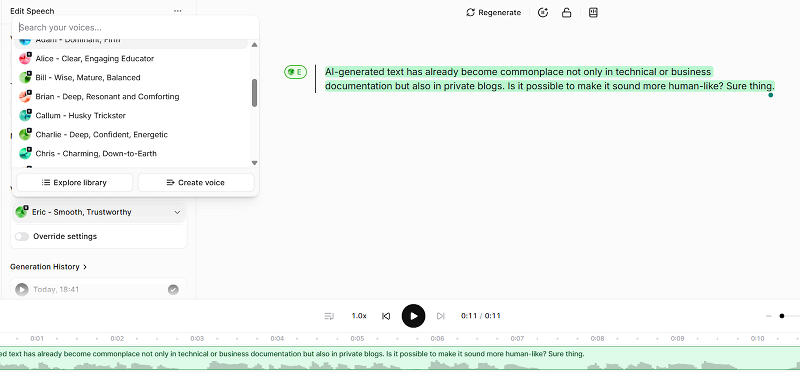
When you are happy with the script, you can add some natural-sounding voiceover (text-to-speech function). This option will come in handy if you don't have a sound studio and equipment, or just don't feel confident enough to record your own voice. I've investigated one of the biggest players for writing sound and creating brand voices.
This service belongs to top-tier platforms that provide exceptionally realistic voiceovers. While some reviewers mention excellent value for its price, others consider the tool to be too expensive.
Even a free mode has quite abundant functionality with an extensive voice library.
YouTube and AI-generated content
As I've already mentioned, popular platforms have launched a crusade against AI content. In 2024, YouTube introduced an "Altered Content" label for videos that have been changed or generated with the help of AI, especially if they look realistic and could mislead a viewer. If the author doesn't use this label, it can be applied automatically, or, in the most severe cases, the channel may be suspended.
An important caveat: AI scripts don't need disclosure, as they are just sources of your inspiration, and there is no difference whether the plot was composed by a human or by an artificial brain. But realistic voice clones (as well as generated "photos" of people) give the impression that a real person did or said something, which is why they should be labeled.
You can always convert AI to human text with the help of special tools, but we would also recommend manual revising and editing. For example, add a human touch by sharing your personal experience and adding jokes.
No, AI scripts are not forbidden on YouTube. However, you should label your content if it's AI-generated and includes realistic images or voices of people (especially well-known ones).
It depends on your goals. Overall (and based on my personal experience), stealthwriter.ai and Scribbr are quite decent.
There is no evidence that YouTube uses any algorithms for AI detection. Still, it's always better to humanize AI-generated text for enhanced readability and overall quality.
Up to you. There are no legal policies for this matter (yet).