AI Chatbots vs. AI Agents Guide for Beginners
Traditional chatbots, or "chatbot agents," were once considered "child prodigies" when they first appeared about a decade ago. But "the King is dead — long live the King!" Meet AI agents, which act as full-scale, almost independent AI assistants.

It's easier than ever to get lost in terms like "chatbot agent", "AI assistant", "natural language processing", and "machine learning", especially when different articles use them interchangeably without proper explanation.
This guide is going to lay it on the line. Our aim is to help business owners and marketers choose the best tool for customer support. By the end of this article, you'll (hopefully) understand the difference between AI agents and chatbots and how artificial intelligence can replace or augment human agents.
As your humble narrator spent about two years getting her hands dirty creating and maintaining an up-to-date chatbot, I'll also share some personal stories, lifehacks, and tips. Stay tuned, and off we go!
Chatbots, agents, and LLMs
AI chatbots can be roughly called "previous-generation" agentic AI tools. They are usually based on scripts and knowledge bases and mimic a real conversation between a user and an assistant. A chatbot receives a user's query and searches its database for a solution. If one exists, it provides the user with a link or a ready-made manual. If there is none, a human intervention is needed, and a real person steps in. It might seem that a chatbot "understands" human language, but it doesn't; it just looks for matches in its documentation.
Examples:
- ChatGPT, Claude, Deepseek, etc.
- Customer support chatbots on companies' sites.
- Embedded in-app AI assistants.
AI agents, on the other hand, work more autonomously. They can "think" and analyze, and unlike chatbots, they don't just answer questions and find answers, but perform tasks, such as "write a promotional email and send it to all the customers born between 1980 and 1999". Properly set up and tuned, they rarely require intervention by live agents, and both enhance the customer experience and decrease the burden on helpdesk support teams.
Examples:
- Microsoft Copilot
- Autoclaw
- ClickUp
- Salesforce Agentforce
Despite obvious differences, both chatbots (advanced ones, such as ChatGPT, Claude, Gemini, etc.) and agents are powered by large language models (LLMs). These systems are trained on vast amounts of data and, as a result, can "understand" natural-language requests and provide users with a personalized experience. LLMs enable smart assistants of both kinds to summarize articles and other texts, answer complex and simple questions, resolve tasks, and perform other actions.
Differences between AI agents and AI chatbots
A caveat! You can use both tools for the same tasks, as they don't interfere but rather supplement each other. But you have to be aware of the differences, though. Let's mark chatbots as CB and AI agents as AA.
Autonomy
- CBs are about automation. They rely on preset scripted responses and decision trees, so they can answer basic questions but can't make autonomous decisions.
- AAs are relatively autonomous. They can execute complex workflows without human intervention.
Approach
- CBs are reactive. They just answer questions but don't initiate discussions.
- AAs are proactive. They can initiate new actions or follow-ups.
Memory
- CBs' memory is usually limited to one session, especially for the simplest non-AI models.
- AAs can "remember" the context across multi-step tasks.
Tools and technologies in use
- CBs use knowledge bases with structured data and scripts.
- AAs use APIs, real-time web data, and information retrieval from product documentation.
- Both use natural language processing (NLP).
Purpose
- CBs assist users by providing information.
- AAs help users by performing complex tasks on their behalf.
AI chatbots benefits and drawbacks
First-generation chatbots were just prewritten scripts with very limited functionality. The introduction of artificial intelligence (AI) made a real difference, but some drawbacks persist.
- A relatively cheap and fast solution that is easy to build and maintain
- Cost reduction because fewer humans are needed
- Chatbots are available 24/7 and can speak any language
- If the chatbot falls short or doesn't have the needed answer, a human should step in
- Not suitable for decision-making in complex situations and can provide mostly basic information
- "Hallucinations" and incorrect answers are possible
Like every AI tool, chatbots still can't function fully independently without human supervision. Overall, they save users' time and reduce the company's costs.
AI agents benefits and drawbacks
AI agents are more advanced, but even the sun has dark spots, so these tools are not perfect either.
- AI agents proactively interact with users and can take action when necessary.
- They are able to handle complex requests, "keeping in mind" the context from previous queries.
- They save companies' costs and teams' time by handling routine and/or manual tasks.
- Setting up and tuning can take several weeks.
- Maintaining them is more expensive and requires more experienced specialists than chatbots.
Overall, there are more benefits than drawbacks, but not every company has the resources to implement AI agents yet.
AI chatbot use cases
Enough with theory. Let's focus on practical tasks and use cases for each tool. As we are a video editing platform, we'll concentrate on how to use AI agents and chatbots at each stage of video editing.
These tools can "talk" with you, offer advice and recommendations, but can't really "do" anything.
Pre-production
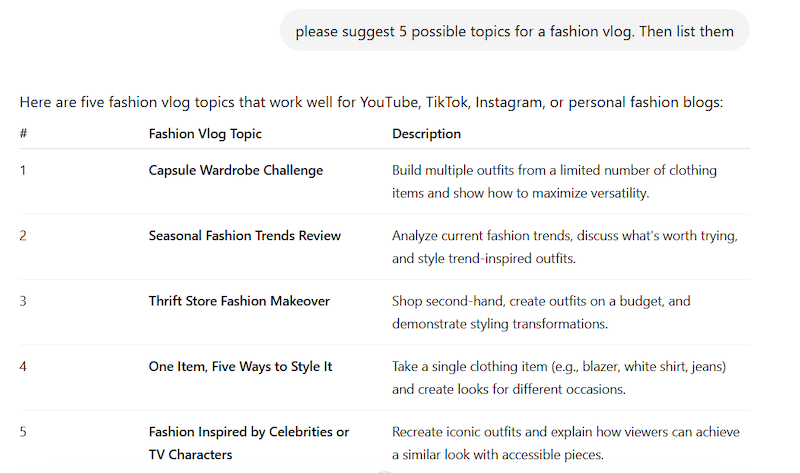
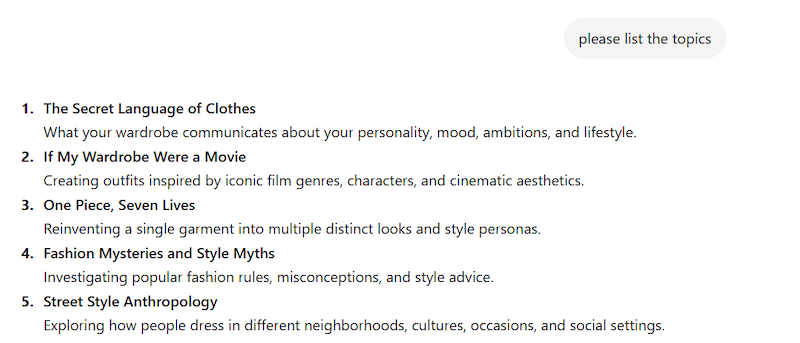
- A chatbot can generate a list of ideas for the subject at hand. For example, a prompt may be worded as "please suggest 5 possible topics for a fashion vlog" or "outline a script for a book review".
- If the script is already written, the AI tool can suggest possible cuts, review the text for mistakes, and recommend the best formats and platforms.
During editing
- An AI chatbot can create subtitles or captions, or proofread existing ones.
- Even at this stage, a chatbot can be helpful by suggesting shot ideas, clip descriptions, or editing techniques.
Post-production
- You can ask a chatbot about the chosen platform's specifications, such as export format or aspect ratio, to ensure the project meets them.
- An AI chatbot can recommend the best posting time or analyze users' behavior and provide recommendations for the next videos.
AI agent use cases
AI agents can perform tasks on behalf of a user, so you can delegate real actions to them.
Pre-production
- While an AI chatbot could just generate ideas, an agent can create a visual storyboard with a detailed scene plan.
- Such tools can also identify the needed outsourced tools (for example, for creating voiceover or captions) and even allocate tasks to them.
During editing
- An agent can autonomously detect peaks in raw footage and create a shorter highlight video. Another example is that the tool can divide an original recording into several shorter reels and edit them in various styles.
- The tool can also work with the soundtrack: remove filler words or repeated phrases.
Post-production
- Instead of manual color correction, a user can ask an agent to apply color-grade presets based on the detected scene type.
- Not only can an agent create subtitles, like a chatbot, but it is also able to translate them and lip-sync the new soundtrack in another language.
Best practices for working with AI tools
Several common rules apply when working with any AI tools: be consistent, set clear tasks, provide as many details as possible, etc. Still, there are several specific hints and tips for AI agents and chatbots.
Tips for working with AI chatbots
- Make your prompts as clear and detailed as possible. Any ambiguous phrasing or lack of context can lead to unsatisfactory output, and you'll need to refine it with additional prompts. If you're working with free AI chatbots and have limited tokens, that might be crucial.
- Double-check. Don't take the information provided by AI at face value. Hallucinations and mistakes are still very common.
- Ask an agent to play a role. First of all, it's funny. Second, surprisingly, it often improves the output.
Compare the output with a role:
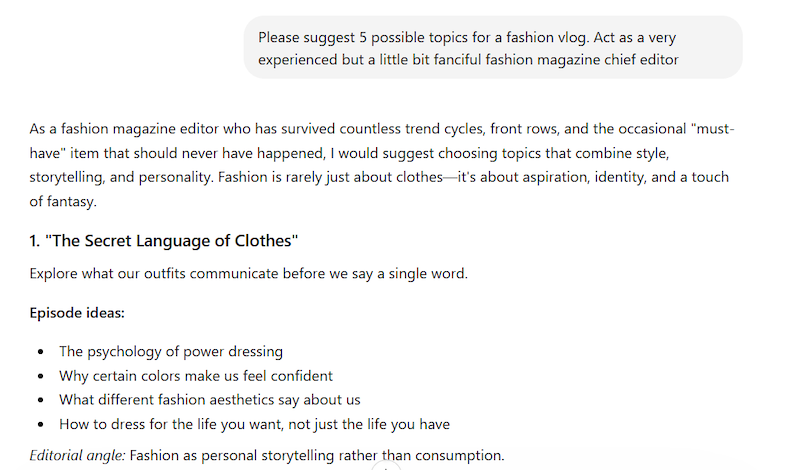
... and without a role:
Tips for working with AI agents
AI agents can handle multi-step tasks and speed up repetitive work, but the quality of the output still depends on the quality of the instructions. Here are some most important tips:
- Break a complex task into stages. Even though an AI agent can perform some tasks on your behalf, it doesn't mean it can understand ambiguous or vague instructions.
- Define a clear goal from the start. The more specific you are about the outcome, the more useful the response will be.
- Invest time in setting up a workflow, and try it out on small, repetitive tasks first.
In the end, better results come from better guidance. Clear goals, structured steps, and gradual testing make AI agents more reliable and effective.
Risks, limitations, and other notes
Alongside their benefits come important risks and limitations that we should understand before relying on them too heavily.
- Skynet is not approaching yet: hallucinations, illogical outputs, and confident but totally wrong answers still occur quite often.
- If the task is more important than "provide me with a weather forecast," human review is highly recommended, even for a weather forecast.
- Poor prompts result in poor outcomes.
- AI agents require access to various tools, which can cause privacy and security issues, especially with confidential data.
- AI tools are impartial and unbiased, right? Wrong. They are created and programmed by people, and they are also limited by local and international laws and regulations. Try several tools and find the one that works best for you.
Used thoughtfully, generative AI can be a valuable support tool — but it should not replace judgment, verification, or common sense. The best approach is to treat its output as a starting point, not a final answer, especially when accuracy, privacy, or fairness matter.
Will AI agents replace chatbots or humans?
Well, honestly speaking, we don't know.
There are optimistic bravados that never ever is it going to happen. But the truth is, it might. Just a few years ago, we were laughing at AI translations and poems because they were visibly crippled and ridiculous. And who has the last laugh now, when even established artists and writers use AI tools and no one can tell which parts were "artificially" created without special AI detectors?
So, let's put it this way: AI agents will not replace chatbots or humans in the near future. Time will show.
An AI chatbot is a tool that answers users' questions, provides step-by-step instructions, and generates ideas, but it can't perform complex tasks.
An AI agent is a "next-generation" AI tool with new possibilities and capabilities: it can fill out forms, write and send emails based on mailing lists, and work independently on various tasks.
If you just need a quick, simple instruction, information, or idea, a chatbot is your best bet. If the task involves a complex workflow with multiple steps, it's an agent's job.
Absolutely. In fact, it's the best way to work: you can gather information with a chatbot first, then assign the resulting tasks to the AI agent.
Yes, it can, if the workflow is properly tuned. But human review is still needed.