
What is a Supercut Video: How to Create Compelling Compilations
Supercut videos are a way to create something new from familiar moments. Discover what makes this format so special, where to find the best examples, and how to make your own.


Think of all the Arnold Schwarzenegger one-liners from all his action movies, put together in less than 5 minutes. Or hearing every single time a reality show contestant declares, "I'm not here to make friends". This is the magic of a supercut, a video that takes one concept and beats it into the viewer's head until they get it, whether it's a joke, a criticism, or just plain old recognition. A supercut is a collection of short video clips on a specific topic, and the result is digital content that is half entertainment and half observation.
This article will explain what supercut videos are, how they differ from other compilation videos, where to find some of the best supercut videos on the Internet, and how to make your own supercut video using a browser-based video editor. If you're a creator seeking to grow your audience on social media or just curious about this popular format, the steps and tips below will help you get started.
Understanding supercut videos
Supercut is a video compilation technique that involves cutting together many short video clips from movies, television shows, political speeches, or other media around a theme or concept. This theme can be a phrase that is repeated, a visual theme (such as a character putting on sunglasses), a recurring action, or a specific cliché. The clips are first assembled and then put together in a single montage that emphasizes the pattern by sheer repetition.
In 2008, Andy Baio, a blogger and technologist, coined the term "supercut" to refer to "obsessive video montages" that "show every time a phrase, action, or motif appears in a film or series in one video". Supercuts gained popularity in the late 2000s when YouTube became popular and became a part of Internet culture. The videos of this type were already in existence before Baio coined the term, but it has since become commonplace and even made its way into the dictionary, as YouTube supercut-type videos have been around since 2006.
What makes a supercut different from a montage or highlight reel? A highlight reel is a video that shows the best moments of a source, the most spectacular dunks, the funniest scenes, without being tied to any particular theme. A montage can be used to tell a story, to demonstrate progression or variety. The supercut, on the other hand, is characterized by its thematic specificity and exhaustiveness. It doesn't highlight, it highlights everything of one thing. That repetition is what gives rise to the meaning: you begin to see a pattern you may not have noticed when viewing content normally.
To sum up, some of this format's main features are:
- Thematic focus: All the clips are related to the theme, which can be a word, gesture, or visual element.
- Quick cuts: Cuts are often quick, keeping the pace brisk.
- Pattern recognition: The effect depends on the viewers' ability to see the recurring motif in different films or TV series.
- Cultural commentary: Supercuts frequently serve as cultural commentary on social media, whether it's a subtle criticism of overused tropes, a lampoon of formulaic writing, or a nostalgic celebration.
Types of supercuts
Supercuts can be used to emphasize themes in movies, television, politics, and music – anything that has a pattern throughout a body of work. The primary kinds you will discover are:
One of the most popular types is movie supercuts, when a line from multiple movies, or a cliché, or a visual element is repeated multiple times. The first popular supercut was notably of "CSI: Miami's David Caruso", who was known for putting on his shades before the show's opening credits and delivering a one-liner. That straightforward, repetitive idea started a whole genre of content.
TV show compilations are a feature of a series' running gags or character catchphrases. Consider each occasion a character on a long-running sitcom uttered his or her signature line; if you string them all together, you'll see how integral that line is to the show's identity.
Political supercuts are recordings of multiple statements or actions by a public figure. These are associated with media criticism and demonstrate how politicians repeat the same sentences in various speeches or interviews.
Music video supercuts highlight a particular visual element or text from music videos of a specific time period, genre, or artist.
Supercuts are particularly popular during year-end recap seasons, where creators highlight the most repeated moments from the previous year, which can be thought of as a summary of cultural patterns throughout the year.
Where can you find such supercuts? The main home is still YouTube. They are frequently created by channels and independent creators. There are also sites that collect examples submitted by users.
Why create supercut videos
Supercuts have several functions for creators and viewers, making them a popular choice on various platforms.
The first reason is entertainment. Supercuts can be funny, nostalgic, or just plain satisfying, by taking clichés to the extreme, or by taking a string of favorite moments from a movie or show that people know and love. It's so fascinating to see a trope you've only half noticed exposed by repetition.
Supercuts are also focused on educational and analytical purposes. Supercuts are frequently used to criticize a director's or actor's pattern. Supercuts isolate a filmmaker's visual tics or an actor's go-to phrases, and thus serve as a form of minimalist criticism – no narration required. The argument is the compilation itself.
Supercuts are perfect for social media due to their viral potential and shareability. Their themes make it easy to click on: if you enjoy Marvel films, you'll click on a supercut of all Marvel deaths. The format encourages users to share the content with friends who are interested in the same sources.
When you present the same content in a different way, audience engagement increases. Knowledge of the source material is rewarded, and viewers feel part of a community of shared references.
Marketing applications are also coming to the fore. Supercut-style compilations can be used to emphasize product features, gather customer quotes around a single phrase, or demonstrate use cases in a repetitive manner instead of the traditional storytelling approach.
However, supercuts leave room for creativity in pacing, structure, and emotional effect, which helps shape the final impact for any occasion.
How to create a supercut with Clideo Video Editor
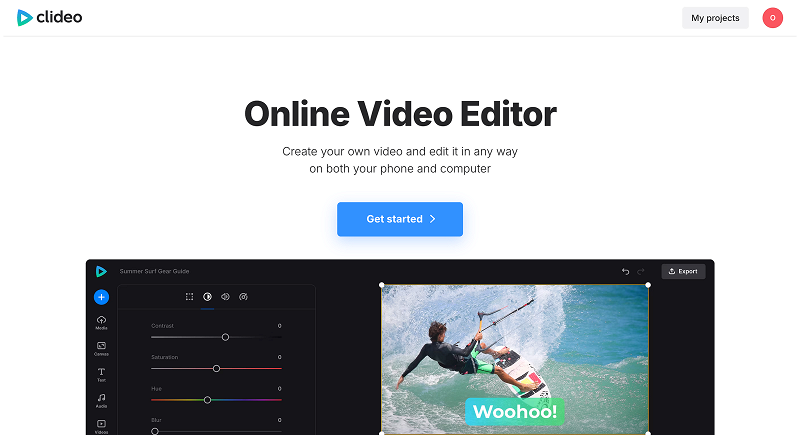
So, are you ready to make your own supercut? Scrubbing through footage and assembling clips can be time-consuming, but you do not require any expensive editing software. Clideo Video Editor is a browser-based video editor that includes all the basic video editing functions you need, and it can be used on any device with a modern browser and an Internet connection.
-
Collect and upload your sources
Before you start, you should prepare yourself: find your theme, collect all the pieces where you can find this theme, and sort your footage. The more systematic you are in your collection, the easier the editing process will be.
Open Clideo Video Editor in a browser and hit Get started. Upload your video clips from your device or cloud storage accounts such as Google Drive or Dropbox.
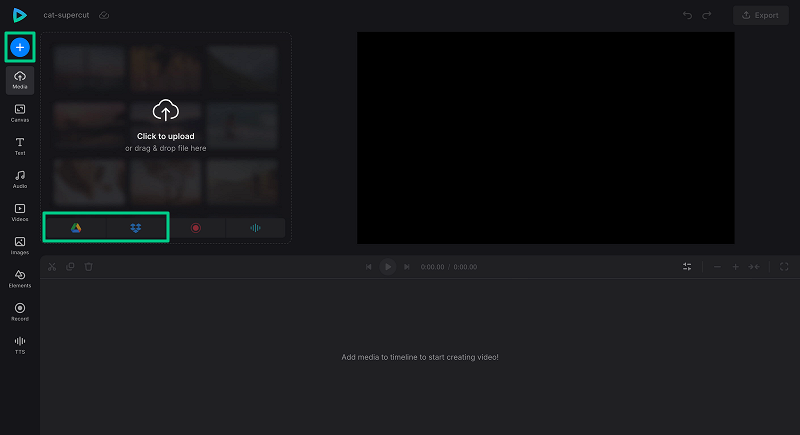
When you upload your clips, they will be displayed on the timeline, and you can start arranging them.
And here's a useful tip: if you don't have footage but are relying on online sources, you can use Clideo's recording feature to capture your screen while a video plays, then add that recording to your project.
-
Change canvas size to fit your target platform
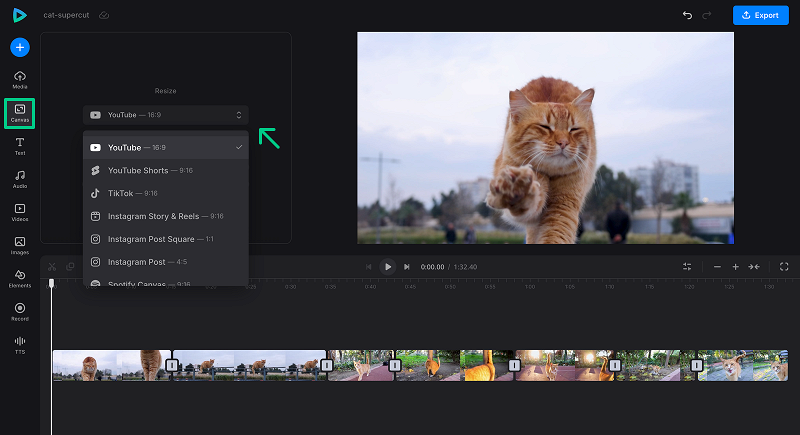
Take into account the aspect ratio needs of your target social media, such as vertical for TikTok and Instagram Stories, or landscape for YouTube. You can choose one from the Canvas tab.
-
Choose and edit short video clips to fit your theme
Trim the footage to capture the specific moments that align with your supercut idea. Supercut editing is a compilation of clips around a theme, and each clip should only have the relevant phrase, action, or visual - no more. So cut tight.
Trim out any unnecessary footage at the start and end of each clip to keep the pace quick, as is the style of the format. Use the split function to split longer clips into shorter, more precise ones by positioning the playhead at the desired location.
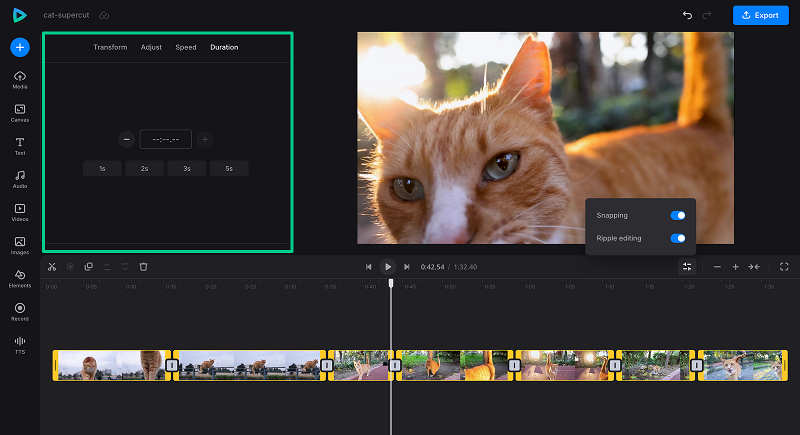
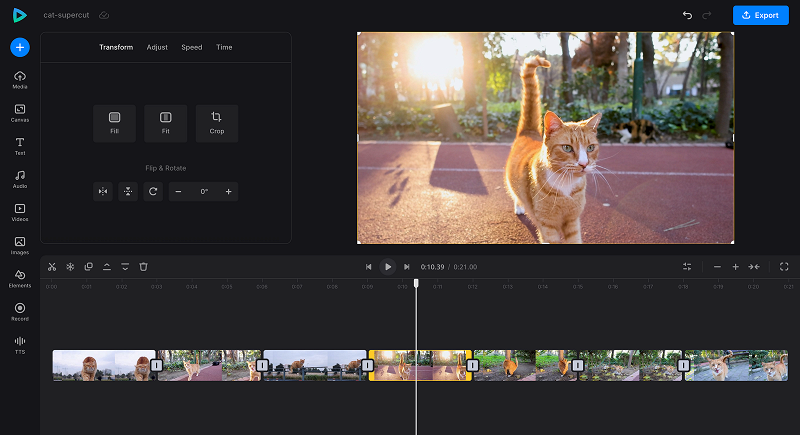
Then organize your clips either chronologically (how a trope developed over time) or thematically (how similar variations of a trope were grouped together).
-
Include transitions and text
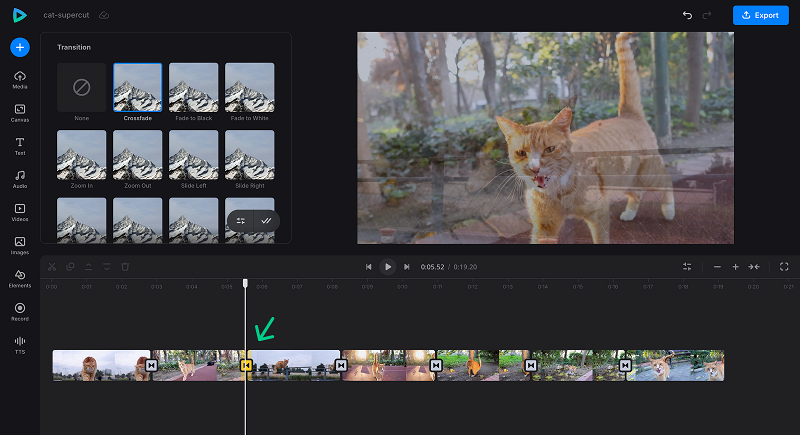
Apply transitions between clips to control the flow. Hard cuts (sudden transitions) are useful for some supercuts to highlight the repetition. Others prefer shorter crossfades that help to smooth the rhythm. It depends on the theme and tone you are going for.
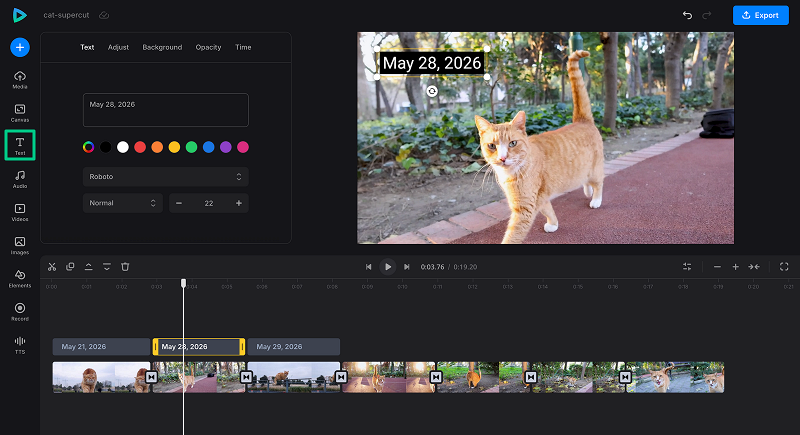
Supercuts can be confusing, and text overlays can help viewers determine which film, show, or year each clip is from. If you like, use background music from Clideo's free stock library to create a consistent mood. Supercuts are cut to fit the rhythm of the music, so make sure you select a song that fits the rhythm and doesn't overpower it.
-
Export your supercut
Watch the entire supercut several times to ensure smooth playback, even audio levels, pacing, and basic quality control before export. Then click Export and choose your desired quality (HD, FHD, or 4K).
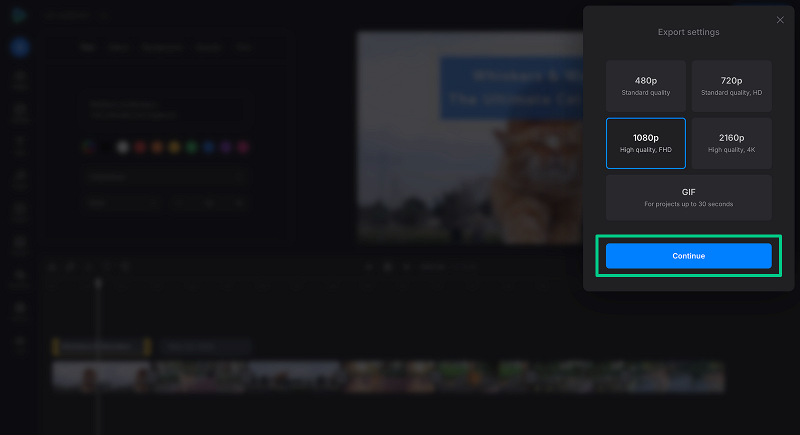
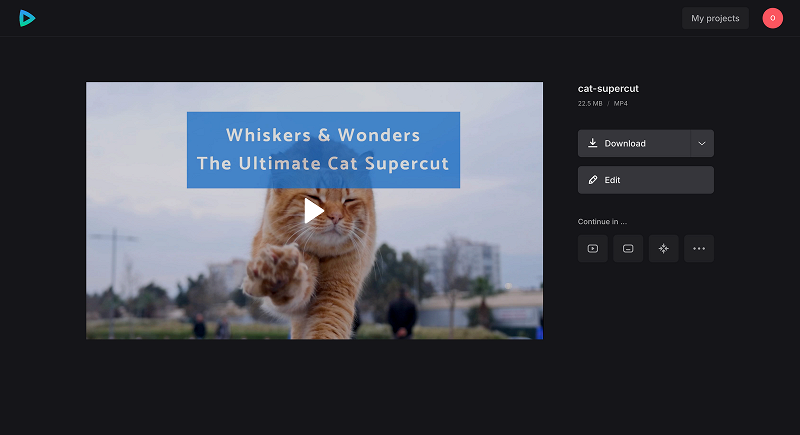
Download the completed video to share on YouTube, Instagram, TikTok, or elsewhere.
-
Advantages and limitations of creating supercuts in Clideo
Clideo Video Editor is an accessible, easy-to-use tool for combining your clips, editing them efficiently, and producing a polished supercut that can live on social media or other platforms. It offers many advantages for creating supercuts, but there are also some limitations to keep in mind.
Advantages- No software installation is required - works in any modern browser on any device.
- Easy-to-use interface as trimming, arranging, transition tools and everything else are all in one place.
- In-built media library including stock music and effects for audio design
- Projects are synced between the web editor and mobile app, allowing you to edit flexibly across devices.
- Autosave saves your work when you're working for a long time
Disadvantages- No offline editing and saving - the web version requires an Internet connection
- May not support advanced color grading and complex effects as much as professional desktop editing software
- The free plan has upload file size restrictions, so for large assets, it might be necessary to upgrade to Clideo Pro.
Tips for creating engaging supercuts
The distinction between a forgettable compilation and a supercut that people share widely is craft. Here are some tips that are based on what works:
- Select one theme. It should be clear, recognizable, and understandable to your audience. The idea should be specific enough to be repeated without getting tedious, but general enough to have enough clips. "Every time a character in Tarantino films says 'What?'" will work. "Interesting movie moments" will not.
- Start strong. The first clip should set the tone and indicate the theme. Within the first few seconds, viewers will determine whether they will continue watching or not, so don't save your best content for the end.
- Maintain consistent pacing. Use different lengths of clips to create rhythm – a few short clips followed by a slightly longer clip can create a breathing pattern that keeps people engaged. Supercuts can use faster cuts to add comedic moments, and longer cuts can add dramatic weight.
- Aim for a length of 3-8 minutes for best engagement and shareability. Supercuts are short montages of long content that show the important moments – it's all about compression. If you're not presenting something really interesting, anything longer than 10 minutes will bore your viewers.
- Audio design is one of the ways to reinforce a certain mood in supercuts. Even out the volume between clips to avoid jarring volume changes. Have one background music track to tie the experience together and fade audio from one clip to another.
- Include source attribution or credits when using copyrighted material. This will not provide legal protection, but it will show good faith and help viewers find the original work.
- Test different arrangements. The order of clips is crucial. Experiment with chronological order, grouping by intensity, and randomizing - which order has the most satisfying rhythm? Reordering can also make the supercut feel like a compressed memory reel, similar to revisiting a past relationship through selected moments.
- Supercuts that are successful have a consistent editing style. if you find a certain rhythm, type of transition, and visual style, stick with it. It's consistency in style that makes a random compilation a supercut.
Common mistakes when making supercuts
Despite having a great concept, there are a few common mistakes that can take the wind out of a supercut's sails:
- Too many similar clips that are repetitive and do not lead up to something. Each clip should add a new variation or escalation. If 3 clips feel the same, cut 2.
- Bad mixing of audio from various sources. The audio profile of clips from various movies and TV shows will vary greatly. If levels are not normalized, it will be an uncomfortable listening experience and detract from the content.
- Making supercuts too long causes viewers' fatigue and reduces engagement. If your compilation is longer than 8 or 10 minutes, think one more time whether every clip deserves to be included. Longer supercuts are not necessarily better.
- Failure to respect copyright when using commercial content. While supercuts that are transformative and commentary-based may be considered fair use, commercial use or wholesale reproduction of copyrighted footage is a real risk. Platforms are strict on takedowns.
- Inconsistent video quality between clips creates a jarring viewing experience. It's distracting to mix HD footage with low-resolution footage from the early 2000s. Crop, resize, or use the same treatment to reduce contrast.
- Excessive editing with effects that detract from the content. The clips should do the job. Supercuts can be effective, but heavy filters, constant split-screens, and flashy transitions can detract from the simplicity.
- Choosing the wrong format or missing compression steps that your target platform requires. The aspect ratio, length, and video file size for TikTok will differ from a supercut for YouTube. Edit and export accordingly.
A supercut can be for a theme, a phrase, or a pattern that is found in several sources, but a regular compilation can simply be a collection of highlights without a theme. The term "supercut" suggests that it's not a "best of" reel, but a record of a pattern, and that it's exhaustive. Supercuts are a type of compilation that focuses on clichés or repeated phrases in media, which regular compilations do not even try to do.
If your supercut is for the purposes of commentary, parody, criticism, or education, then fair use may apply. The key considerations are whether you are using it in a transformative way, how much of the original work you are using, and whether your video could be used in place of the original work in the market. However, fair use is never guaranteed - it's a legal defense, not a permission. Many creators limit their use to short snippets, give credit, and make sure that their edits contribute something new to the original content.
The length of most successful supercuts is between 3 and 6 minutes, which is enough to cover the theme but not too long to keep the audience's attention. Some viral examples are as short as 1-2 minutes – short, punchy, and highly shareable. There are longer supercuts of 20-30 minutes, but these are for dedicated fan audiences who are willing to invest the time.
Quality matters more than numbers. Usually, 15-50 clips are sufficient, and each clip should be relevant to the theme and concept. A one-minute supercut could consist of 20 tightly cut clips; a five-minute version could have 60 or more. The rule of thumb for the test is: if it doesn't affect the impact if it is removed, it probably shouldn't be there.
A phone could be enough. Clideo's mobile app offers the same features as the web version and syncs in between, ensuring a flexible editing experience. Basic tasks like trimming and arranging clips can be done on a phone, but more in-depth audio mixing and fine-grained timing adjustments are typically easier on a larger screen.